

Quickstart#
A guided tour through Cellestial’s main capabilities. Each section builds on the previous one, so it is best read top to bottom on a first pass.
Installation#
pip install cellestial
uv add cellestial
poetry add cellestial
Load Example Data#
Cellestial ships with helpers that download and preprocess a few common datasets. The first call fetches and prepares the file; later calls just read the cached copy.
from lets_plot import *
import cellestial as cl
data = cl.datasets.pbmc3k()
The returned object is a standard AnnData. Every plotting function in
Cellestial accepts it directly, picks up embeddings (UMAP, t-SNE, PCA),
metadata columns (cluster IDs, cell types, QC metrics), and gene expression
without any extra wiring.
Your First UMAP#
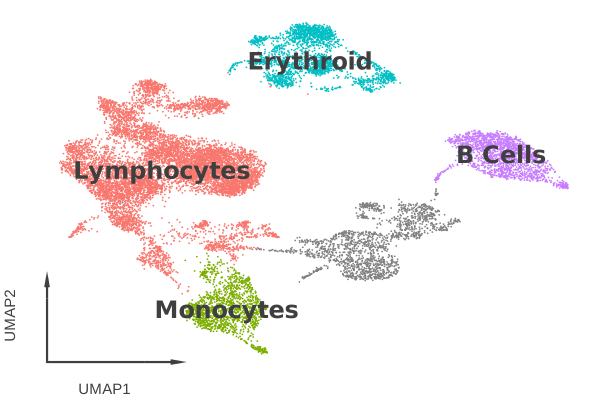
The simplest entry point is cl.umap. Pass an AnnData and a key,
which can be either a categorical metadata column (cluster ID, cell type,
sample) or the name of a gene.
cl.umap(
data,
key="cell_type_lvl1",
axis_type="arrow",
legend_ondata=True,
) + scale_color_hue()
Two Cellestial-specific touches in the call above:
axis_type="arrow"replaces the full XY axes with a small arrow indicator in the corner. Useful for dimensionality reduction plots where the absolute coordinates carry no meaning.legend_ondata=Truewrites group labels directly on top of the clusters and removes the side legend.
Everything after the + is plain Lets-Plot. scale_color_hue() swaps in a
ggplot-style hue palette.
Visualize Gene Expression#
The same function plots a gene by passing its name as key. Cellestial
detects that the value is numeric and switches to a continuous color scale.
(
cl.umap(
data,
key="MS4A1",
axis_type="arrow",
color_low=cl.LIGHT_GRAY,
color_high=cl.RED,
)
+ ggtitle("MS4A1 expression")
)
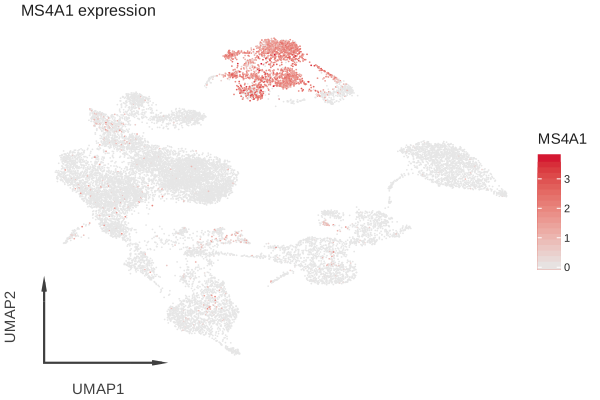
color_low and color_high set the endpoints of the gradient.
cl.LIGHT_GRAY and cl.RED are convenience constants; any hex code or
named color works too.
Cellestial Layers#
Cellestial adds a small set of single-cell-specific layers on top of
Lets-Plot. They compose with + like any other geom.
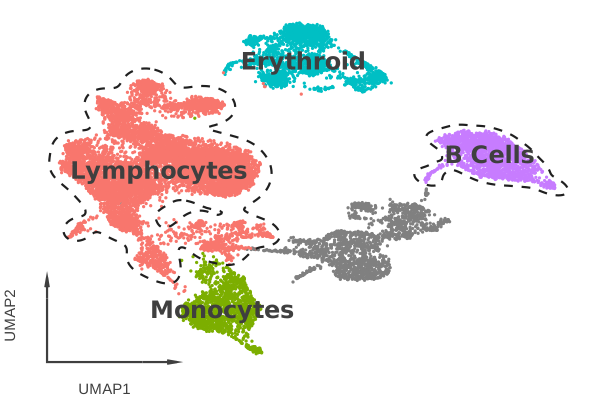
cluster_outlines draws a contour around the cells that belong to one or
more groups, which is handy when calling out a population in a figure.
(
cl.umap(
data,
key="cell_type_lvl1",
axis_type="arrow",
size=1.5,
legend_ondata=True,
)
+ scale_color_hue()
+ cl.cluster_outlines(groups=["Lymphocytes", "B Cells"])
)
Other layers worth knowing:
cl.arrow_axisadds the corner arrow axes as a standalone layer when you did not passaxis_type="arrow".cl.ondata_legendwrites labels on top of clusters as a standalone layer.cl.streamoverlays an RNA-velocity stream, shown later in this tour.cl.bracketadds significance brackets to distribution plots, shown next.
Statistical Comparisons#
cl.boxplot and cl.violin accept a numeric key (typically a gene)
and an explicit grouping aesthetic via fill. The cl.bracket layer
runs pairwise tests and draws annotated brackets between the requested
groups.
(
cl.boxplot(
data,
key="CD3D",
fill="cell_type_lvl1",
threshold=0.1,
)
+ scale_fill_hue()
+ cl.bracket(
y_padding=0.2,
label="pvalue",
prefix="p",
prefix_style="<",
comparisons=[
("Lymphocytes", "Monocytes"),
("Monocytes", "Erythroid"),
("Monocytes", "B Cells"),
],
)
)
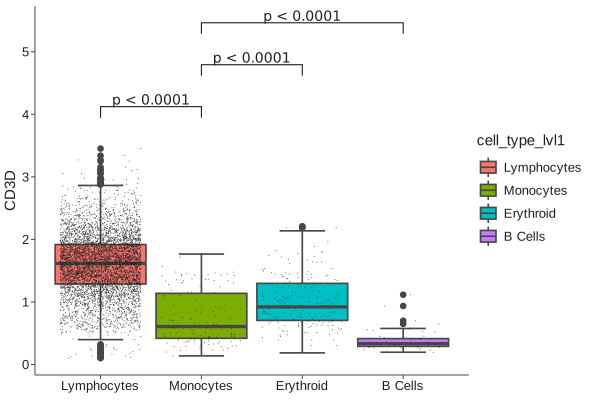
threshold=0.1 filters out cells with expression below the cutoff before
the test, which is often what you want when the zero pile dominates the
distribution.
Marker Genes Across Clusters#
When summarizing many genes against many groups, dotplots, matrixplots and heatmaps are usually clearer than overlaying everything on a UMAP.
markers = [
"PSAP", "LYZ", "CST3",
"CD79A", "CD79B",
"IL7R", "CD3D", "CD3E", "CD4",
"CD8A", "CD8B",
"NKG7", "GNLY", "KLRD1",
"HLA-DRA", "FCER1A",
]
cl.heatmap(
data,
group_by="cell_type_lvl1",
keys=markers,
geom="raster",
group_lines_size=0.5,
group_lines_color="white",
group_bars=True,
group_bars_labels=True,
dendrogram=True,
dendrogram_size=1,
) + scale_fill_viridis()
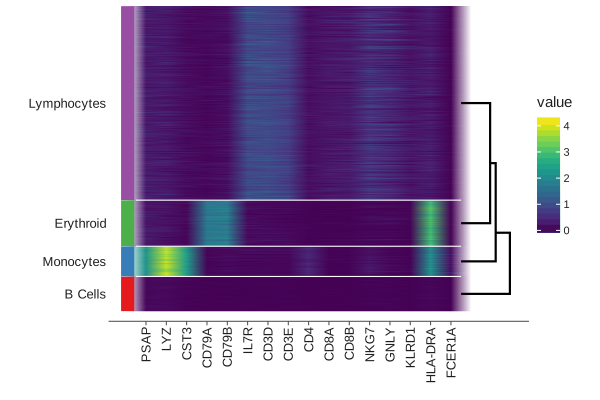
dendrogram=True adds a hierarchical clustering of the groups, so the
rows reorder themselves into something interpretable. group_bars and
group_lines_* draw labeled separators between cell-type blocks. Swap
cl.heatmap for cl.dotplot, cl.matrixplot or cl.stacked_violin
without changing the rest of the call.
Composing With Lets-Plot#
Cellestial plots are Lets-Plot PlotSpec objects, which means anything in
the Lets-Plot toolbox composes the same way. A few common moves:
cells_plot = cl.umap(
data,
key="cell_type_lvl1",
axis_type="arrow",
size=1.5,
legend_ondata=True,
) + scale_color_hue()
gene_plot = cl.umap(
data,
key="NEAT1",
axis_type="arrow",
color_low="#f6f6f6",
color_high="#219B9D",
)
gggrid([cells_plot, gene_plot], ncol=2) + ggsize(1000, 400)
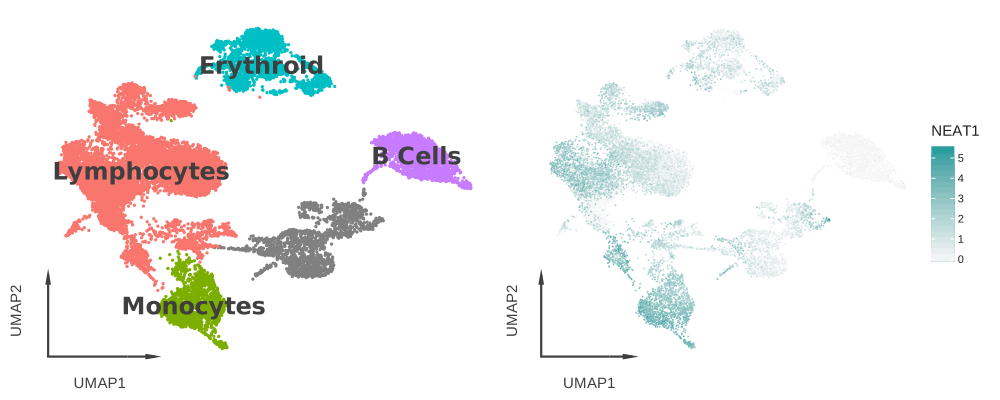
gggrid arranges plots side by side, ggsize pins the figure size, and
themes, scales and titles all combine through + exactly as in ggplot.
Beyond Single-Cell#
Cellestial covers spatial transcriptomics and RNA velocity through the same grammar.
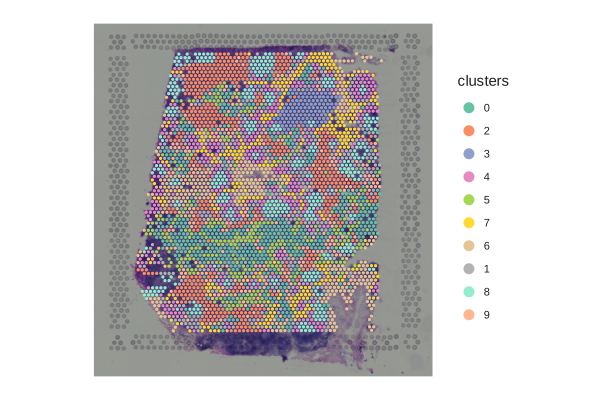
Spatial overlay on tissue coordinates:
spatial_data = cl.datasets.human_lymph_node()
cl.spatial(spatial_data, key="clusters")
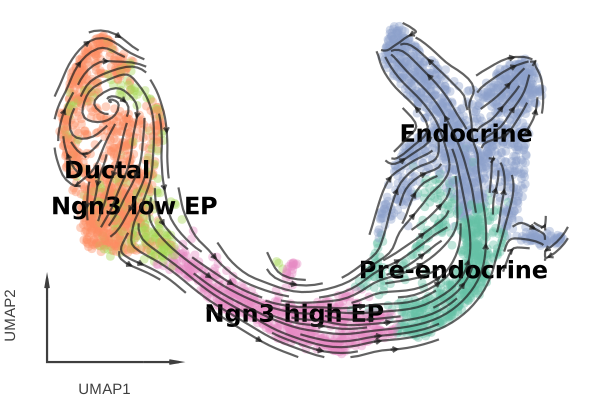
RNA velocity stream on a UMAP:
velocity_data = cl.datasets.pancreas()
(
cl.umap(
velocity_data,
key="clusters_coarse",
axis_type="arrow",
size=4,
alpha=0.4,
legend_ondata=True,
ondata_color="black",
)
+ cl.stream()
)
Saving Plots#
cl.save writes any Cellestial or Lets-Plot figure to PNG, SVG, PDF or
HTML. The format is picked from the file extension.
plot = cl.umap(data, key="cell_type_lvl1", axis_type="arrow")
cl.save(plot, "umap.png", path="figures", w=8, h=6, unit="in", dpi=300)
Where To Next#
API Reference for the full function reference.
Features for a deeper look at each plot family.
Design Philosophy for the design principles behind the API.